In ABAP, associations define how business entities relate to one another and enable navigation, lifecycle control, and UI integration in SAP Fiori applications. In this post, you’ll learn how to create and link associated entities—using “Ingredient” as an example—and connect them to the “Recipe” root entity through compositions, projections, behavior definitions, metadata extensions, and service definitions. First, you must create a base entity for the associated entity. To do so, follow these steps: The CDS coding will then be generated from the listing below based on the template and the referenced object. define view entity ZACB_R_Ingredient select from zacb_ingredient { key recipe_id as RecipeId, key ingredient_id as IngredientId, name as Name, quantity as Quantity, unit as Unit, created_by as CreatedBy, created_at as CreatedAt, local_last_changed_by as LocalLastChangedBy, local_last_changed_at as LocalLastChangedAt, last_changed_at as LastChangedAt, last_changed_by as LastChangedBy } Now you need to repeat steps 1–4 to create a projection entity. However, this time you don’t select a template (see figure below), but click directly on the Finish button. An empty data definition gets created. You can use the defineProjection- View pattern to trigger an automatic code generation. For this purpose, you should enter “defineProje...” in the empty editor window. The quick fix function of the ABAP development tools will then suggest the appropriate template. When you select the template, the code will automatically be generated from this listing. @AccessControl.authorizationCheck: #NOT_REQUIRED @EndUserText.label: 'Ingredient' @Metadata.ignorePropagatedAnnotations: true define view entity ZACB_C_Ingredient as projection on data_source_name { } Add the name of the base entity here as data_source_name. You can also specify the fields of the base entity and use key to define which fields are key fields. define view entity ZACB_C_Ingredient as projection on ZACB_R_Ingredient as Ingredient { key RecipeId, key IngredientId, Name, Quantity, Unit, LocalLastChangedAt, LocalLastChangedBy, LastChangedAt, LastChangedBy, } Now, the two base entities must first be linked to each other via an association. To do this, we first create a composition from the root entity in the direction of the linked entity (see listing below). A composition defines an existential dependency between two entities, whereby the child entity can’t exist without the parent entity. define root view entity ZACB_R_Recipe as select from zacb_recipe composition [0..*] of ZACB_R_Ingredient as _Ingredient { key recipe_id as RecipeId, recipe_name as RecipeName, … At the level of the associated entity, you must use association to parent to add an association to the root entity. This creates an upward relationship with the root entity. @EndUserText.label: 'CDS entity Ingredient' define view entity ZACB_R_Ingredient as select from zacb_ingredient association to parent ZACB_R_Recipe as _Recipe on $projection.RecipeId = _Recipe.RecipeID { key recipe_id as RecipeId, key ingredient_id as IngredientId, … A link between the two entities must also be created at the level of the projection entities. In the root entity, you must add the redirected to composition child expression. … define root view entity ZACB_C_Recipe provider contract transactional_query as projection on ZACB_R_Recipe { … _Ingredient : redirected to composition child ZACB_C_Ingredient, } A similar link is made from the associated entity to the root entity. Here, you need to enter the redirected to parent addition (see listing below). The relationship defined in this way is used to navigate between the entities in the service binding. … define view entity ZACB_C_Ingredient as projection on ZACB_R_Ingredient as Ingredient { … _Recipe : redirected to parent ZACB_C_Recipe } You must define a behavior for each entity. To do this, you want to extend the behavior definition as shown in this listing. managed implementation in class zbp_acb_r_recipe unique; strict ( 2 ); with draft; define behavior for ZACB_R_Recipe alias Recipe … association _Ingredient { create; with draft; } … define behavior for ZACB_R_Ingredient alias Ingredient persistent table zacb_ingredient lock dependent by _Recipe authorization dependent by _Recipe draft table zacb_ingredien_d { update; delete; field ( readonly ) RecipeId; field ( readonly ) IngredientId; association _Recipe { with draft; } mapping for zacb_ingredient { … } } These associations must also be defined in the behavior definition of the projection entities. projection; strict ( 2 ); use draft; define behavior for ZACB_C_Recipe alias Recipe … use association _Ingredient { create; with draft; } … define behavior for ZACB_C_Ingredient alias Ingredients … use association _Recipe { with draft; } To ensure that the linked entities are displayed in the SAP Fiori app, both the metadata extension of the root entity must be extended and a separate metadata extension must be created for the child entities. A facet must be added to the metadata extension of the root entity. { id : 'controlSection', type : #LINEITEM_REFERENCE, position : 20, targetElement: '_Ingredient' }, The targetElement annotation is used to indicate that the metadata extension of the associated entity is supposed to be called and displayed in this section. Finally, the association must be specified in the service definition. @EndUserText.label: 'Recipe' define service ZACB_UI_RECIPE { expose ZACB_C_Recipe as Recipe; expose ZACB_C_Ingredient as Ingredient; } Once all created and modified development artifacts have been successfully activated, the link between the two entities can be seen in the service binding. Repeat the steps shown here for all associated entities. Associations in ABAP do more than connect entities—they define ownership, lifecycle dependency, authorization handling, and UI navigation across your application. By combining compositions, projection redirects, behavior definitions, metadata extensions, and service exposure, you create a fully navigable and transactional relationship between entities such as Recipe and Ingredient. Once activated, these associations seamlessly power SAP Fiori navigation and draft handling, making structured entity modeling a critical skill for modern ABAP development. Editor’s note: This post has been adapted from a section of the book ABAP Cookbook: Practical Recipes for Modern Programming by Fabian Lupa and Sven Treutler. Fabian is a senior software engineer and trainer at Adesso, where he has worked since 2022. His primary responsibility is employee training and development in the context of ABAP programming, as well as developer enablement in customer projects. Sven is a passionate ABAP developer. He has worked on ABAP development at rku.it GmbH in Herne since 2010. There, he focuses on new technologies and quality assurance in the ABAP environment. This post was originally published 2/2026.Step 1: Creating a CDS Data Definition for an Associated Entity

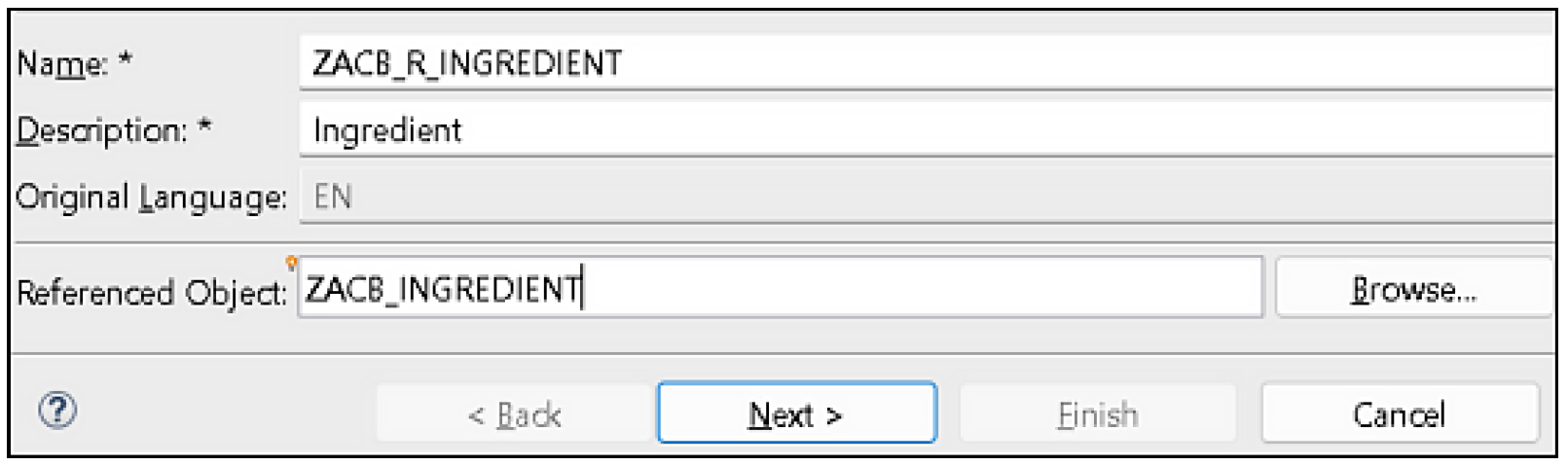
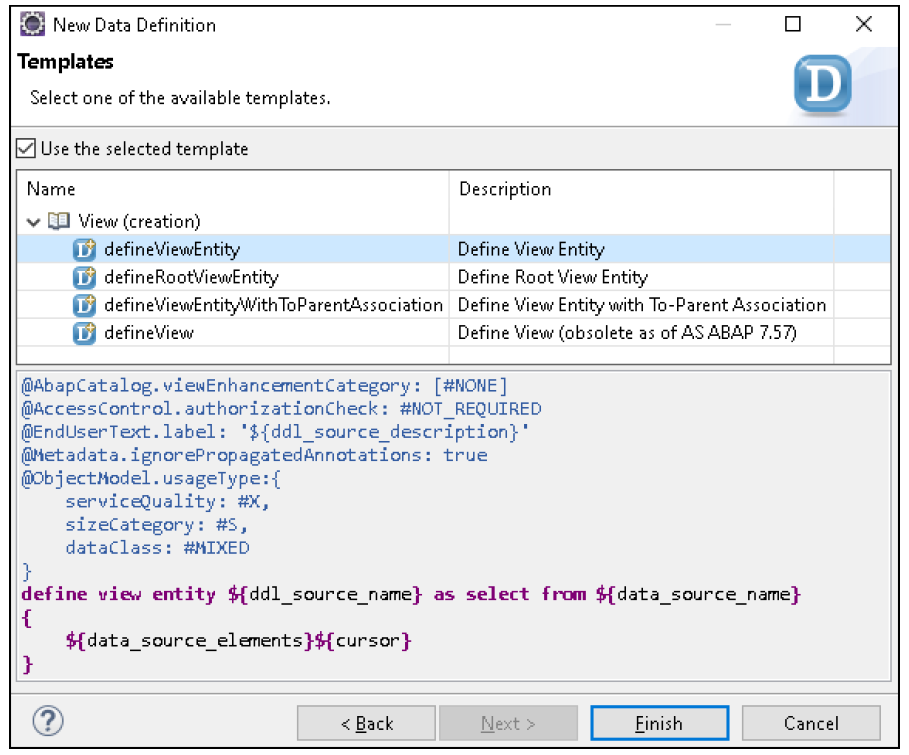
Step 2: Creating a Projection View in ABAP CDS
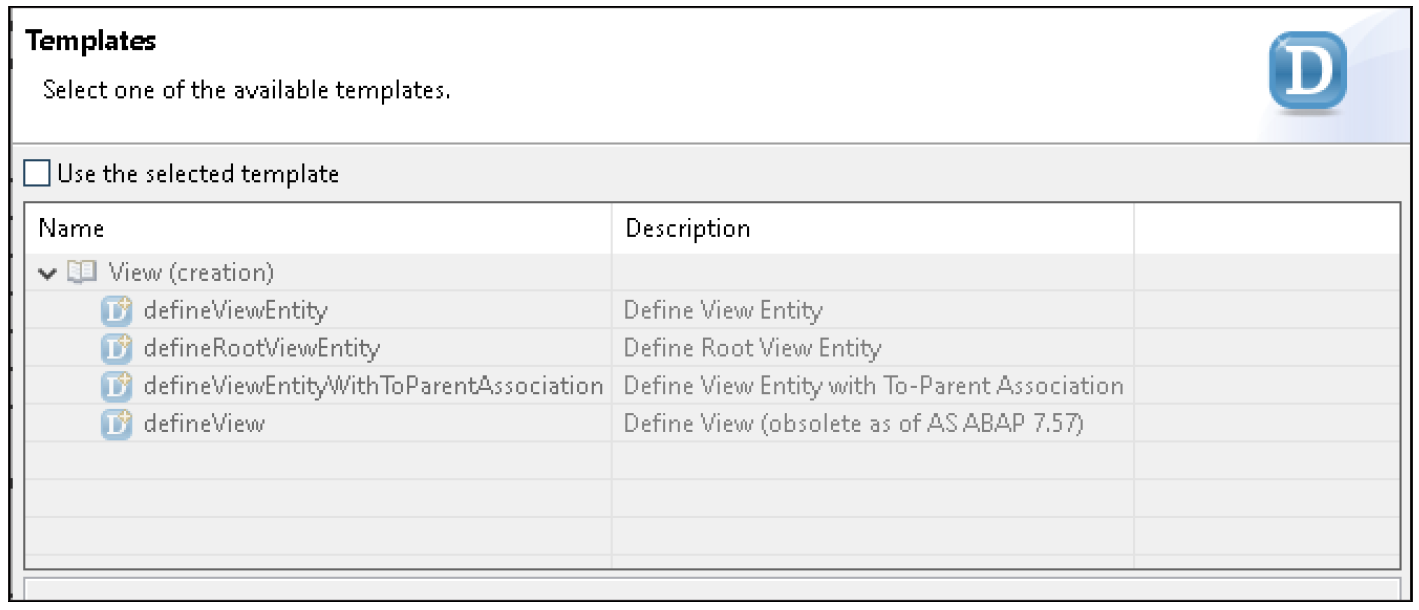

Step 3: Defining Fields and Keys in the Projection Entity
Step 4: Linking Base Entities with Composition and Association
Step 5: Connecting Projection Entities Using Redirected Associations
Step 6: Extending the Behavior Definition for Associated Entities
Step 7: Updating Metadata Extensions for SAP Fiori Display
Step 8: Exposing Associations in the Service Definition
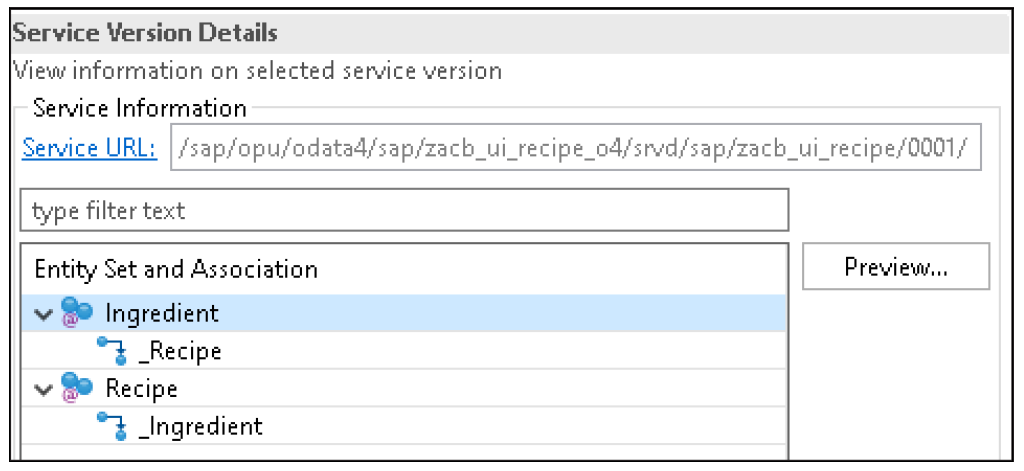
Conclusion
How Associations Are Used in ABAP Programming
 8 hours ago
3
8 hours ago
3
Related


MythBusters: Integrate with SAP Build
3 days ago
7





AI-Powered Retail at NYFW | SAP x PUBLIC SCHOOL NEW YORK
4 days ago
10
Popular

피겨왕자 차준환, 포디움 바로 앞 4위로 밀라노 올림픽 마쳐
1 week ago
86



What is SAP Knowledge Graph? | SAP Expert Explains
3 weeks ago
41


WebMCP (Web Model Context Protocol) 공개
1 week ago
40

.jpg)


Asset Management in SAP Cloud ERP 2602 | Release Highlights
2 weeks ago
34
 English (US) ·
 © Clint's Theme Park 2026. All rights are reserved
